Frequently Asked Questions (FAQ)
Answers to questions I’m asked frequently, but where the information isn’t in one of my regular workbooks.
Email me using the link at the bottom of the page if you have any other questions - but please check this document and the relevant workbook before you do. Remember the workbook also lists other sources of help, including YouTube videos, and a search of the web can often give you useful information.
I’m getting an error when I try to assign a projection, or reproject a layer in QGIS. I’m using a Mac
Problem
When you try to run the Assign Projection or Warp tools in QGIS, you get an error which says ERROR 1: PROJ: proj_create_from_database: Cannot find proj.db.
The tool doesn’t correctly reproject your layer.
Solution
This seems to be a problem with particular versions of QGIS on a Mac. There is a page about the proj.db problem on the web. We have worked out a few possible solutions but there is no guarantee any of these will work:
The three possible solutions appear to be:
- Try the instructions for macOS Cannot find proj.db error.
- If you installed the Regular version for macOS, try uninstalling that and installing the Nightly builds for macOS instead. Do note that there have been some problems with using projects created in a nightly build. These have then not been able to be opened in the version of QGIS on University clusters. So be careful when you make the decision about whether to work on your own laptop or on a University computer.
- Use the Python console to link to proj.db by doing the following:
- Open the Python console by going to
Plugins > Python console. - When it opens, type in the two lines of code below.
- Open the Python console by going to
import os
os.environ["PROJ_LIB"]="/Applications/QGIS.app/Contents/Resources/proj"
I can’t run the Fix Geometries tool successfully. I’m using a Mac.
Problem
Sometimes you need to run the Fix Geometries tool before being able to use some selection or extraction tools, such as Intersect, Select by Location or Extract by Location. Unfortunately, on a Mac, this tool sometimes causes an error and doesn’t run.
Solution
Unfortunately this seems to be a problem with Mac not having an updated QGIS package. There doesn’t seem to be a solution at the moment (March 2023), but we’ll keep an eye on the Github page about the error.
Until a solution becomes available, all I can suggest is that you try the selection/intersection/extraction tool without using fix geometries. Sometimes this will work. If you get an error telling you that you need to fix geometries, then I’m afraid the only solution I can suggest for now is to log on to a Windows computer in a cluster to run this part of the processing.
The workbook tells me to install the Spreadsheet plugin, but I can’t find it in the plugin manager
Problem
The Spreadsheet plugin isn’t appearing in the list of plugins which can be installed. Is there another way to import spreadsheets? This appears to have become a problem in February 2026 and maybe related to changes to QGIS or to the plugin, which doesn’t appear to have been updated since 2024.
Solution
There is an internal tool which will allow you to import spreadsheets but they do need to be saved in csv format rather than Excel.
- Save your Excel file as a csv file instead of xls or xlsx - Save as… in Excel then change the filetype.
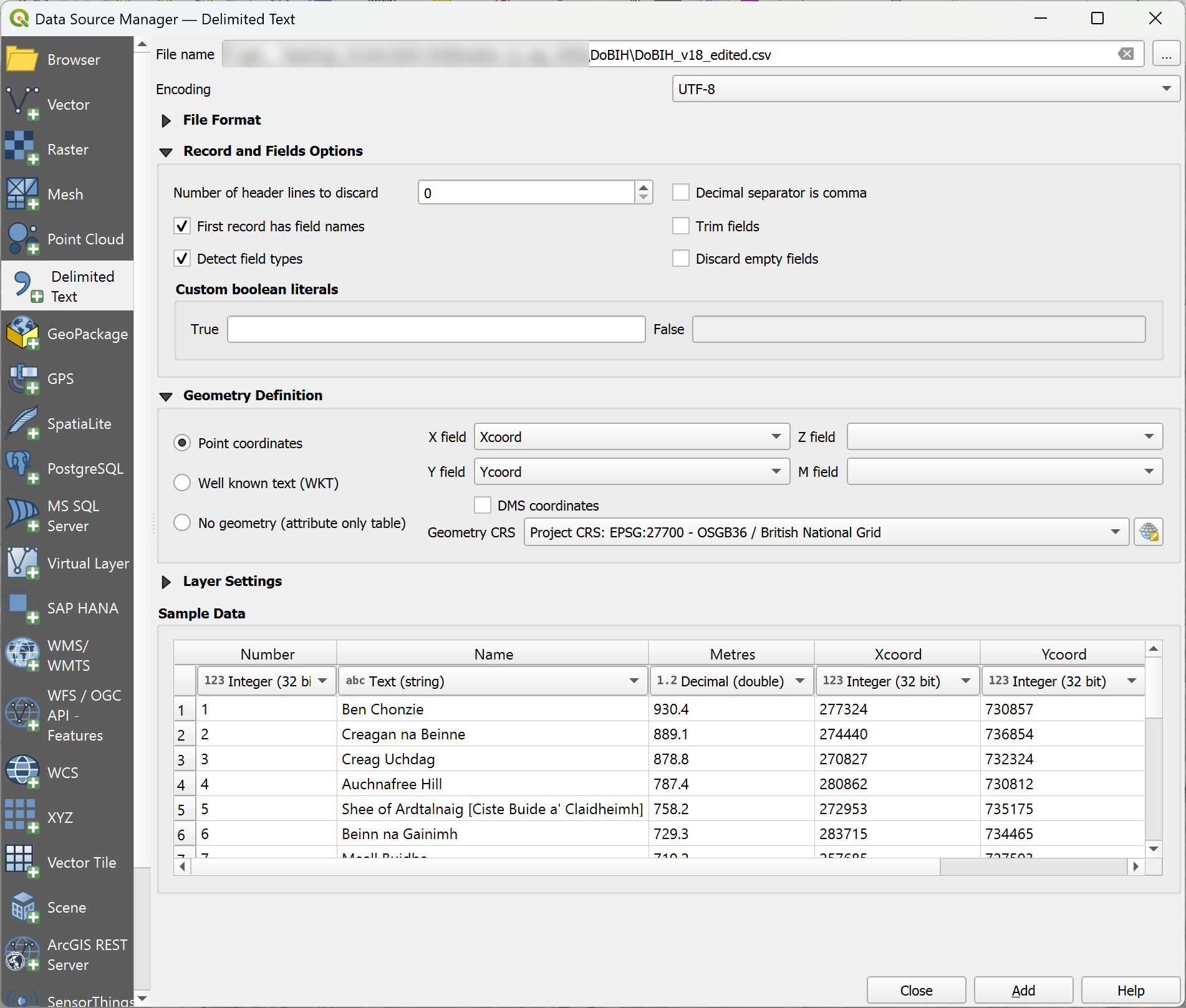
- In QGIS, press Ctrl-L to open the Data Source Manager.
- Click on Delimited Text on the left.
- Select your csv file; set the Point coordinates to Xcoord and Ycoord
- Set the Geometry CRS to British National Grid
- The sample data should show correctly - see the attached image.
- Click Add and it should be added to your project. As with the other method, make sure you then save this output as a proper GIS file, e.g. GeoPackage.
I’m importing a spreadsheet with numbers using the spreadsheet plugin. I’m changing the type to a number, but the fields are still importing as text
Problem
There seems to be a problem with the Spreadsheet plugin at the moment. Even if you change columns to a numerical type, such as Real before you import them, they are still text once imported. This means you can’t then use them in the Field Calculator to create a Total column.
Solution
You can correct this problem by continuing to use the Spreadsheet plugin, but then using the Refactor fields tool. Search for Refactor in the Processing toolbox. Once you open that tool you can change field types, so change the fields to Decimal (double) or Integer (if you don’t have decimal places) and you should be able to use the field calculator on them.
Alternatively, follow the instructions in the question below to import a spreadsheet using the Data Source Manager in QGIS instead.
Some processing tools are failing with an error if I try to save the output to a temporary layer
Problem
When running a processing tool in QGIS and generating a temporary layer as output, the tool fails with an error and doesn’t generate the output layer(s). The error message says something about a particular file not being specified. If you run the same tool with exactly the same parameters, but save the output to a file, it works with no problem.
You can get around this easily when running individual tools, just by saving the output to file, but if building a graphic model it isn’t possible to use the output of one algorithm as the input to another.
Solution
The solution appears to be to change the default output extension in the QGIS options as this may be set to a format such as xtf.
In QGIS, go to Settings > Options. Look for the Processing tab and click on the General subheading at the top of that page. Next to Default output vector layer extension type gpkg. It’s also worth checking the default output raster layer extension is set to tif.
I’ve scanned my geological field slip and it’s in pdf format, but now I can’t add it to GIS to georeference it
Problem
As you’ve discovered QGIS won’t allow you to add pdf files to a map. You need to convert the pdf to png, tiff or jpg formats - any of which will be fine.
Solution
Either rescan the document and select jpg or tiff output, or (and this may be the simpler way to do it!) use one of the many online converters. smallpdf.com is easy to use. It can convert between pdf and various file types including jpg.
An alternative for University of Leeds members is to use ABBYY Fine Reader PDF from AppsAnywhere.
How can I reduce the number of contours on my map?
Problem
The contours on your map look crowded and are difficult to read. This may be because you are working in a hilly area or because the intervals of the contour dataset you have available are too small, e.g. 5 m when you actually need 10 m.
Solution
You can use a query in QGIS to show a subset of your contours, for example, only the contours with a value at 10 m intervals rather than 5 m. This creates the layer on your map without having to change the data in the original layer.
- Duplicate the existing contour layer (just in case!) and make the original invisible.
- In the duplicated layer go to properties and the
sourcetab. - Under the
Provider Feature Filterbox, click onQuery Builder. - Select the appropriate field (in this case
PROP_VALUE) and enter the following statement:
"PROP_VALUE" %10 - 0The % is the modulus operator. 10 is the multiplier for the contours you want to keep.
- Click
OKand the layer should only show the 10 m contours on your map now.